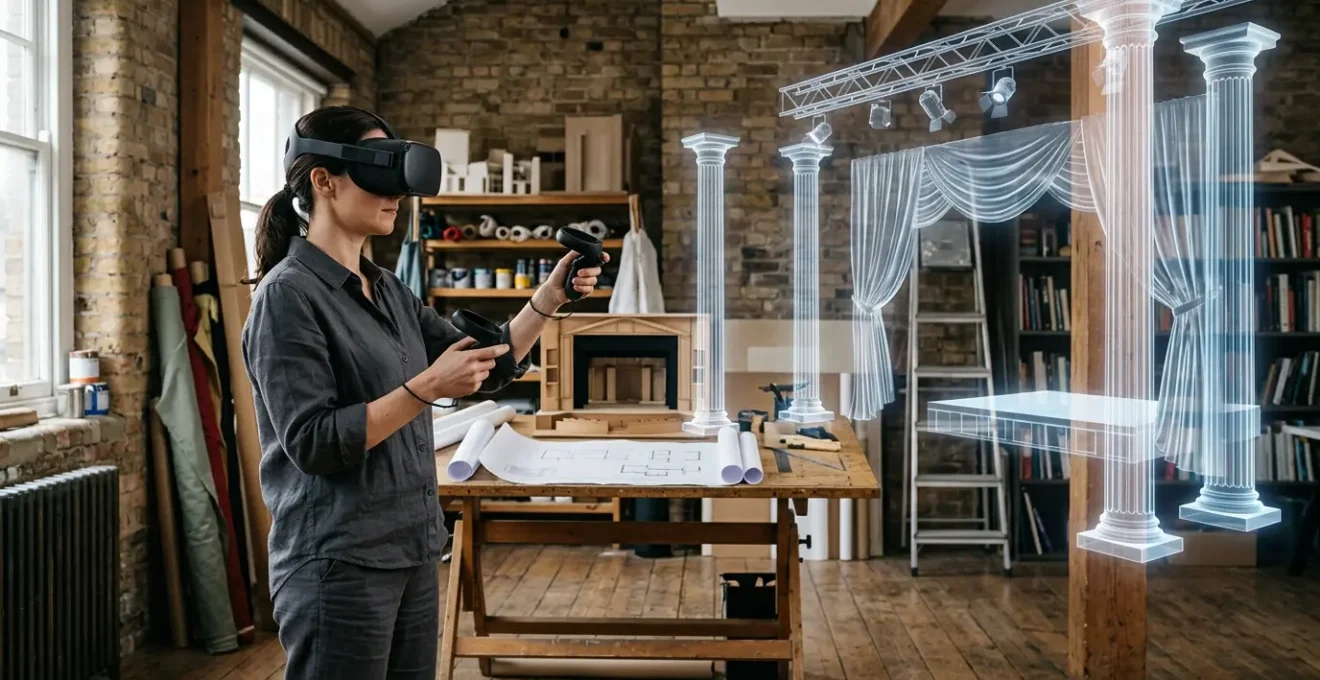
Spatial VR sketching allows theatre designers to translate their hand-drawn artistry into accurate, volumetric models, reducing construction costs and enhancing creative collaboration.
- It solves the critical scale-to-stage problem through the “Digital Twin” imperative, ensuring 1:1 accuracy.
- It streamlines technical workflows by exporting precise volumetric data directly to lighting and construction teams.
Recommendation: Start by integrating one phase of your existing workflow, such as creating a simple VR maquette from your initial physical sketches.
For the theatre set designer, the journey from a gestural sketch on paper to a physical, breathing environment on stage is a sacred craft. It’s a process built on intuition, experience, and the tangible feel of a cardboard maquette. The emergence of Virtual Reality (VR) often feels like a cold, technological intrusion, threatening to replace this nuanced artistry with complex software and sterile digital models. Many guides simply list tools or promise a vague digital future, missing the point entirely.
But what if VR wasn’t a replacement, but an extension of the designer’s own hand? What if this technology could capture the energy of a pencil stroke and translate it into a three-dimensional space you can walk through, light, and inhabit alongside the director and actors? The true revolution in volumetric stage design isn’t about abandoning traditional skills; it’s about amplifying them. It’s about creating a spatial maquette that is not only visually representative but also rich with data, a collaborative sandbox that respects the iterative, human-centric nature of theatrical creation.
This guide moves beyond the hype to offer a practical workflow for UK-based designers. We will explore how to integrate spatial VR sketching to reduce costs, solve complex technical challenges, and ultimately, deepen the collaborative process. We will examine the critical importance of scale, the impact on live performance, and how to bridge the gap between time-honoured physical drafting methods and the powerful potential of this new, spatial medium.
This article provides a comprehensive overview of integrating VR into your design process. Below, the summary outlines the key stages we will explore, from initial cost-saving strategies to advanced collaborative techniques with your production team.
Summary: A Designer’s Guide to Volumetric Stage Design
- Why Does Spatial VR Sketching Reduce Set Construction Costs by up to 30%?
- How to Export Spatial Paintings into Usable Formats for Theatre Lighting Desks?
- The Scale Calibration Flaw That Makes VR Sets Incompatible with Real Stages
- Real-Time VR Projection or Pre-Rendered Backdrops: Which Enhances Live Acting?
- When Should Directors Invite Actors to Rehearse Within the Virtual Set?
- Tethered PC VR or Standalone Headsets: Which Delivers a Better Gallery Experience?
- Why Do Hand-Drawn Concept Sketches Secure More Client Approvals Than 3D Renders?
- How to Integrate Physical Drafting Methods into Modern Architectural Workflows?
Why Does Spatial VR Sketching Reduce Set Construction Costs by up to 30%?
The most compelling argument for adopting VR in set design is often financial, but the savings go far beyond simply avoiding a few physical models. The primary cost reduction stems from transforming a visual concept into precise, machine-readable volumetric data. When you create a set in a spatial environment like Gravity Sketch, you are not just making a picture; you are defining volumes, surfaces, and exact dimensions that can be exported for real-world fabrication.
This “digital-to-physical” pipeline dramatically reduces material waste and construction errors. Instead of relying on manual interpretations of 2D drawings, construction teams receive exact cutting lists and 3D models for CNC machines. This eliminates the costly guesswork and iterative adjustments common in traditional builds. Furthermore, the ability to conduct immersive stakeholder walkthroughs early in the process ensures buy-in from directors and producers before a single piece of lumber is cut. Catching a sightline issue or a scale problem in the virtual world costs nothing; discovering it during the build can be financially catastrophic.
Ultimately, the cost saving isn’t about replacing designers but about empowering them with tools that translate their creative vision into a flawlessly executable plan. It closes the gap between artistic intent and technical reality, ensuring the budget is spent on the stage, not on fixing preventable mistakes. This streamlined process is key to achieving significant efficiency gains.
- Create initial volumetric design in VR using tools like Gravity Sketch.
- Export the 3D model with precise measurements for CNC cutting lists.
- Conduct immersive stakeholder walkthroughs for immediate sign-off.
- Generate material optimisation reports from the volumetric data.
- Share the digital twin with construction teams for ultimate clarity.
How to Export Spatial Paintings into Usable Formats for Theatre Lighting Desks?
A virtual set is incomplete until it is lit. One of the most significant breakthroughs in theatrical VR workflows is the ability to bridge the gap between the set designer’s virtual creation and the lighting designer’s console. This is achieved through standardised data exchange protocols, most notably MVR (My Virtual Rig), which has revolutionised inter-departmental collaboration.
The MVR format acts as a universal container, bundling the entire show’s data—3D set geometry, fixture information, patch data, and more—into a single file. This allows a designer to export their spatial design from a program like Vectorworks and have a lighting designer import it directly into a visualisation suite or a console like the grandMA3. The result is a seamless transition from architectural concept to a fully pre-visualised lighting environment. This saves countless hours of manual data re-entry and prevents critical errors in translation between different software platforms.
This integration is more than a technical convenience; it fosters a more profound artistic dialogue. As documented in a case study on workflow implementation, the MVR protocol empowers true collaboration. An early case study by professional lighting designer Mark LaPierre highlighted this potential, noting that the MVR protocol allows the export of complete shows including set, lights, and data in one file. This enables lighting designers to begin experimenting with mood and focus on a highly accurate virtual model of the set weeks before they would typically have access, leading to a more refined and integrated final production.
The Scale Calibration Flaw That Makes VR Sets Incompatible with Real Stages
The most seductive promise of VR design—the ability to stand inside your creation at a 1:1 scale—harbours its most dangerous flaw. Without a rigorous grounding in reality, a virtual set is merely a digital fantasy, completely incompatible with the physical constraints of the theatre it’s destined for. A set designed in a generic, boundless VR space will inevitably fail when it meets the immovable realities of a specific proscenium arch, a limited wing space, or a unique stage rake.
This is why the concept of the “Digital Twin” is not an option, but an imperative. Before any creative work begins in VR, the workflow must start with a high-fidelity, dimensionally accurate 3D model of the actual performance venue. This is typically achieved through professional laser scanning (LiDAR) or photogrammetry. This digital twin serves as the non-negotiable canvas for the set design. It provides the absolute ground truth for every height, width, and sightline.
Working within a precise digital twin prevents the catastrophic scale calibration flaw. It ensures that a staircase designed in VR will fit the stage, that a backdrop won’t foul on a fly bar, and that an actor’s path is clear of physical obstructions. As a leading industry expert has emphasised, this initial step is the foundation of a credible workflow. In the words of James Simpson, the Royal Opera House’s Lighting Visualizer, the ‘Digital Twin’ Imperative requires starting with a high-precision laser scan or photogrammetry model of the actual theatre venue. Ignoring this principle is the single fastest way to render a beautiful virtual design useless for the real world.
Real-Time VR Projection or Pre-Rendered Backdrops: Which Enhances Live Acting?
Once a volumetric set exists, a new artistic question arises: should the digital elements be pre-rendered and projected as static backdrops, or should they be rendered in real-time, allowing for dynamic interaction with the live performance? This choice fundamentally alters the relationship between the actor and their environment, and each approach offers distinct advantages and challenges for the director and designer.
Pre-rendered backdrops offer predictability and the highest possible visual fidelity. The content is created, rendered, and polished offline, ensuring a consistent, glitch-free image every night. This approach treats the digital scenery much like a traditional painted backdrop, providing a beautiful but static world for the actors to inhabit. It prioritises artistic control and reliable execution over interactivity.
Conversely, real-time VR projection, powered by game engines like Unreal or Unity, turns the set into a responsive partner in the performance. A digital forest can shimmer as an actor passes, or a virtual storm can intensify in response to the dramatic tension. This creates emergent possibilities for storytelling, blurring the line between actor, environment, and technology. As the National Theatre’s ‘All Kinds of Limbo’ project demonstrated, XR frameworks can combine live performance with volumetric capture to create experiences that are simultaneously a play, a video game, and an interactive film. The trade-off is often a higher technical demand and a potential for variability in visual quality.
The choice between these two powerful techniques depends entirely on the production’s artistic goals. Below is a comparison to help guide this critical decision, based on insights from industry analysis.
| Aspect | Real-Time VR | Pre-Rendered |
|---|---|---|
| Interactivity | Responsive to actor movement | Fixed loop playback |
| Visual Quality | Variable based on hardware | Consistently high |
| Artistic Control | Emergent possibilities | Predictable results |
| Technical Requirements | High-end real-time engines | Standard projection systems |
This decision is not merely technical but deeply artistic, influencing the very nature of the performance. As one analysis on the topic highlights, the potential for interactive digital scenery can profoundly change how audiences experience a stage show.
When Should Directors Invite Actors to Rehearse Within the Virtual Set?
Introducing actors to the virtual set is a pivotal moment that can either unlock profound creative discoveries or create unnecessary confusion. The timing and purpose of these sessions are critical. A phased approach allows the production team to leverage the collaborative sandbox of VR at the right moments, without overwhelming the performers’ process. It’s not about replacing the traditional rehearsal room but augmenting it with spatial context at key stages of development.
Early in pre-production, the virtual set is a problem-solving tool for the director and technical teams. It allows for walkthroughs to check sightlines, plan blocking, and identify potential staging issues. Only once the world is stable and the director has a clear vision should actors be invited in. The first actor-led sessions are often about spatial awareness: understanding the scale of the world, the distances between set pieces, and the feel of the environment. This can be invaluable for blocking, especially in complex or abstract sets, allowing actors to build a physical memory of the space before the physical build is complete.
However, it’s crucial to return to the bare rehearsal space for character work. Technology can be a distraction from the core human-to-human connection. The virtual set provides the “where,” but the “who” and “why” are still best discovered in the focused, technology-free environment of a traditional studio. As the team behind the Royal Opera House’s ‘Current, Rising’ noted, this new medium offers a chance to rethink established methods. They found that VR challenges all the traditional hierarchies of opera and allows for a completely different approach to collaboration. The key is to use it as a specific tool for a specific purpose, not as a blanket replacement for established practice.
Your VR Rehearsal Integration Checklist
- Points of contact: List all points where the virtual set impacts the physical production (lighting, construction, acting).
- Collecte: Inventory existing assets, including venue scans, director’s notes, and initial sketches.
- Coherence: Cross-reference the VR model against the script’s mood, director’s vision, and budget constraints.
- Mémorabilité/émotion: Assess key scenes within the VR set. Does the space evoke the intended emotion? Is it memorable?
- Plan d’intégration: Create a phased plan to introduce the VR set to actors, technicians, and builders.
Tethered PC VR or Standalone Headsets: Which Delivers a Better Gallery Experience?
The choice of hardware—a powerful, tethered PC VR system versus a nimble, standalone headset—is not a simple question of “which is better?” but “which is better for this specific task?”. For the theatrical designer, both have a crucial role to play at different stages of the workflow. The “gallery experience” of pitching to producers and the on-stage walkthrough with a director have vastly different requirements.
Tethered PC VR systems (like the Valve Index or Varjo headsets) are the workhorses of the design studio. Connected to a high-end computer, they deliver the raw processing power needed for maximum visual fidelity. This is essential during the creative phase, allowing for complex lighting, high-resolution textures, and intricate geometry without compromise. When presenting a concept in a “pitch room” setting to producers and key stakeholders, the stunning quality of a tethered system can be the deciding factor, conveying the full artistic vision with uncompromising detail.
Standalone headsets (like the Meta Quest series) offer unparalleled freedom. Their lack of cables makes them the perfect tool for on-stage walkthroughs and multi-user collaborative sessions. A director and designer can physically walk the real stage space, wearing standalone headsets that overlay the virtual set, checking dimensions and sightlines in situ. This freedom of movement is impossible with a tethered setup. While their on-board processing limits visual complexity, they are more than adequate for verifying scale, blocking, and spatial relationships.
A hybrid approach is often the most effective. The detailed creative work is done on a powerful tethered system, while a fleet of standalone headsets is used for practical, on-site collaboration. The table below outlines the ideal use case for each system within a theatrical workflow.
| Use Case | Tethered PC VR | Standalone Headsets |
|---|---|---|
| Pitch Room Presentations | High-fidelity visuals impress producers | Limited by mobile processing |
| On-Stage Walkthroughs | Restricted movement range | Complete freedom of movement |
| Multi-User Sessions | Complex setup requirements | Quick deployment for groups |
| Technical Reviews | Superior for detailed examination | Adequate for general overview |
Why Do Hand-Drawn Concept Sketches Secure More Client Approvals Than 3D Renders?
In the world of theatrical design, a peculiar phenomenon exists: a gestural, evocative hand-drawn sketch often secures client approval more readily than a photorealistic 3D render. This isn’t a rejection of technology, but a reflection of human psychology and the collaborative nature of theatre. A polished render can feel final and intimidating, leaving little room for a director or producer to feel like a creative partner. It presents a finished solution, not an invitation to dream.
A hand-drawn sketch, by contrast, is an act of “incomplete design.” Its ambiguity is its strength. It suggests mood, form, and intention while leaving space for the viewer’s imagination to fill in the blanks. It invites conversation and collaboration, making the client feel like a participant in the creative process rather than a mere approver of a finished product. This psychological buy-in is invaluable.
This is where spatial VR sketching finds its unique power. It bridges the gap between the evocative nature of a 2D sketch and the clarity of a 3D model. Tools like Gravity Sketch allow for a “gestural translation,” where the designer’s intuitive, free-flowing hand movements are captured in three-dimensional space. The result is a spatial sketch that retains the energy and ambiguity of a drawing but can be explored in full 3D. As interdisciplinary design expert Alex Coulombe stated in an interview, this connection is direct. He notes, as part of a discussion on the topic, “If you know how to do a really beautiful hand sketch… you’re going to create a beautiful sketch people can move through.” This new medium honours the designer’s existing skill, translating their most valuable asset—their artistic “hand”—into a new, collaborative dimension.
Key Takeaways
- VR is an extension of the designer’s hand, not a replacement for traditional craft.
- The “Digital Twin” of the physical venue is a non-negotiable starting point for ensuring 1:1 scale accuracy.
- Volumetric data from VR models directly informs construction and lighting, reducing costly errors and material waste.
How to Integrate Physical Drafting Methods into Modern Architectural Workflows?
The path to modernising a theatrical design workflow does not require abandoning the rich, tactile traditions of the craft. The most innovative and effective processes are not purely digital but hybrid, weaving together the strengths of physical drafting, cardboard maquettes, and digital tools. The goal is to create a feedback loop where the physical informs the digital, and vice-versa.
This hybrid workflow respects the designer’s ingrained creative process. It might begin with gestural sketches on an iPad or paper, which are then imported into a VR space as traceable image planes to build a rough volumetric form. The process might then move to the physical world, with the creation of a quick, rough cardboard maquette to understand material connections and tactile qualities. This physical model can then be brought back into the digital realm using photogrammetry, becoming a textured, tangible foundation for more detailed VR painting and lighting tests.
This approach retains the “happy accidents” and material discoveries that only physical making can provide, while leveraging the scale, precision, and collaborative power of the digital space. It’s a workflow that honours the designer’s full range of skills. This integration can be broken down into a series of steps:
- Create initial gestural sketches on paper or a tablet (e.g., Procreate).
- Import these sketches into a VR space as 3D-traceable image planes.
- Build a rough physical maquette (e.g., cardboard) for tactile connection.
- Use photogrammetry to scan the physical model into the VR environment.
- Apply detailed digital painting, texturing, and lighting tests on the scanned model.
Everything you’ve already done is still relevant and will help catapult you into new workflows using these new technologies.
– Theater Design Expert, Voices of VR Podcast
By embracing a hybrid approach, you are not learning a new profession but adding powerful new tools to your existing expertise. The first step is to identify one small part of your current process and explore how a spatial tool could augment it. Begin today by translating a single sketch into a simple volumetric form and discover how it enhances your unique artistic vision.